
OpenClaw扫盲版-给不会使用的同学看
March 12, 2026
本文实时更新-大厂牛马 不想工作等着被裁员。🤪免费为大家解答玩虾的各种疑难杂症。
@虾牛-专业养🦞
给大家说个玩小龙虾的心法,遇到问题可以直接问他,它不回答就喷它,大模型也有惰性。我是这么实践来的。大家可以试试。祝你玩虾成功。
还有如果遇到代码报错就去把报错复制给 千问或者Gemini 问答。他比我们聪明,能解决你很多问题。
好的 openclaw 是在于调教优化。要给它配置手脚耳朵,记忆系统等等。好的记忆系统能给你节省好多 token。
飞书:@虾牛-专业养🦞 请备注来意。
官方插件已开源欢迎 Star。
https://github.com/larksuite/openclaw-lark/blob/main/README.zh.md
前言
1.这个东西,最大的作用到底是啥呢?
目前定位就是个人助理,给你一种做皇帝的感觉,情绪价值更足的东西。
2.这东西能做什么呢?
多维度的AI 人。看网页操作等等
首先 这个是官方部署文档 一步一步的来能解决好多问题。如果有问题就看下面的常见问题。
立省 500!30 分钟把 OpenClaw 在飞书上配到可用
其次找不到解决方案可以看下面👇
常见基础问题,非常基础。
1. 400 Total tokens of image and text exceed max message tokens. Request
这个是上下文太大了了。输入 /new 能解决。或者是 token 限额了。
2.飞书如何配置多个龙虾?
先说结论 没必要配置多个, openclaw 现在不稳定,多想想怎么搞稳定和优化 skill 来得更实际。
先玩一个,会了再玩多个👍。
非要配置看看这个大佬的
参考答案2: OpenClaw 多 Agent 飞书 Bot 完整配置指南
3.为什么开通了读取权限机器人没有消息输入框
检查下面几个点:
1.有没有添加机器人权限
2.回调里面事件有没有开启
3.回调里面的长链接有没有点击配置保存?
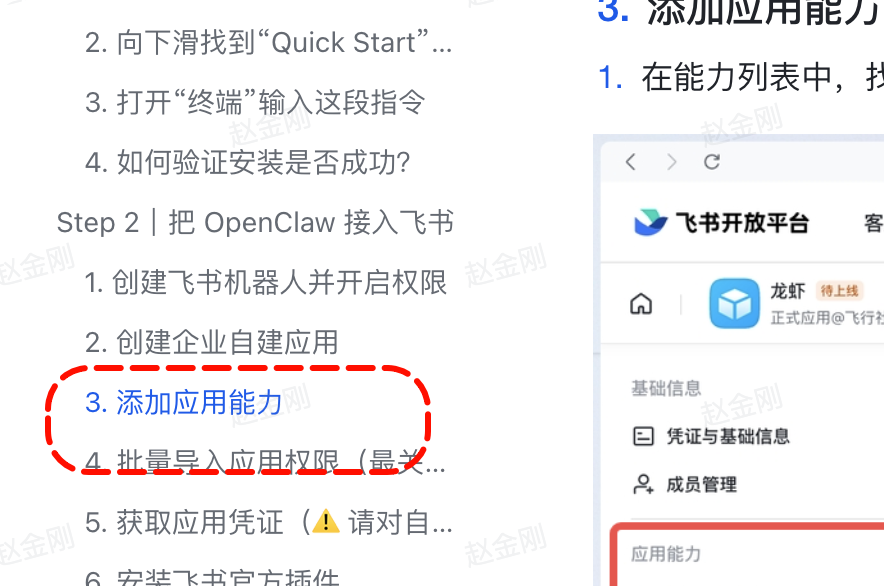
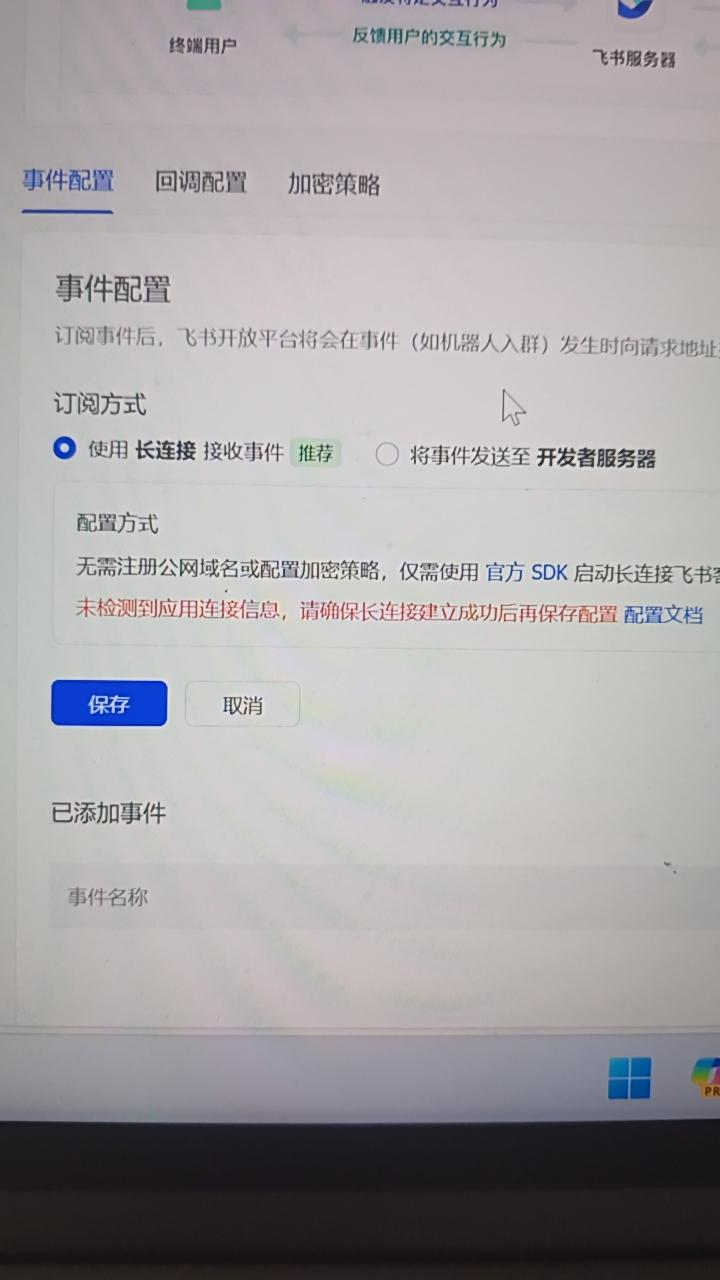
要先在openclaw那里配置这个飞书应用的App ID和secret,然后再来这里开启长链接
4.api 限速APl rate limit reached. Please try again later.

就是表明你这个周期的 apikey 到期了。继续等待或者升级套餐。订阅的套餐达到了限额,5小时后再交互,详细配额如下:在方舟控制台-开通管理可以查看配额以及何时刷新。顺便说明一下 openclaw 是非常消耗 token 的
5.如何保证本地部署的虾不休眠
电脑休眠了,终端没关。🦐就断联。能解决吗?Mac电脑早上联了一下,然后就自己又断开了。
能解决, 如果是想把 Mac 当服务器 24 小时跑项目:强烈不建议这么做。MacBook 的散热和电源管理机制不适合长期高负载做服务器,不仅伤电池,而且一旦意外断电或重启,服务就会中断。这种情况建议使用 PM2 等进程守护工具,并将项目部署到云服务器(如阿里云、腾讯云等轻量应用服务器)上。
如果想重启 就使用 重启命令
6.如何使用 oopenclaw 操作 codex claude code 这些编程工具
我找到了这个解决方案https://zhuanlan.zhihu.com/p/2010127051726792220
✅好用的skill-还在持续补充中
好用的 skill 就像给龙虾加上了利索的手和眼,必不可少。现在好多人都走偏了,应该把重心放在怎么使用 openclaw 提升自己的效率。而不是去做什么多个 agent。那玩意我深度体验后根本不稳定。有共勉的点个赞!
不能下载的使用这个链接下载《Skill合集下载》
好多同学私信我能不能搞个交流 skill 的群,那就搞一个
回复:openclaw养虾群

快捷目录
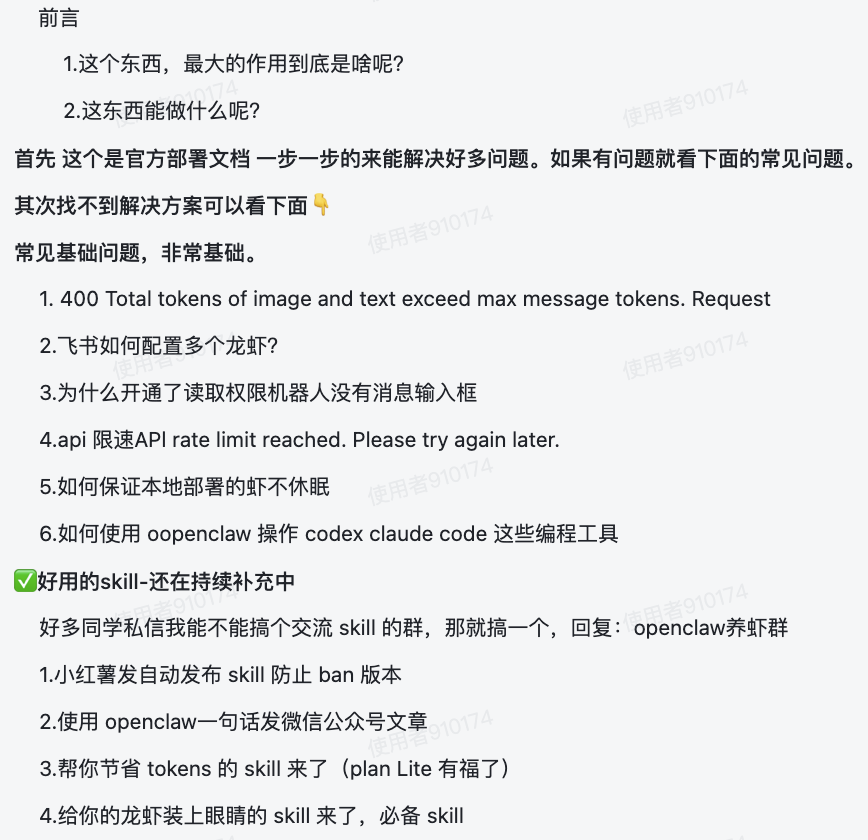
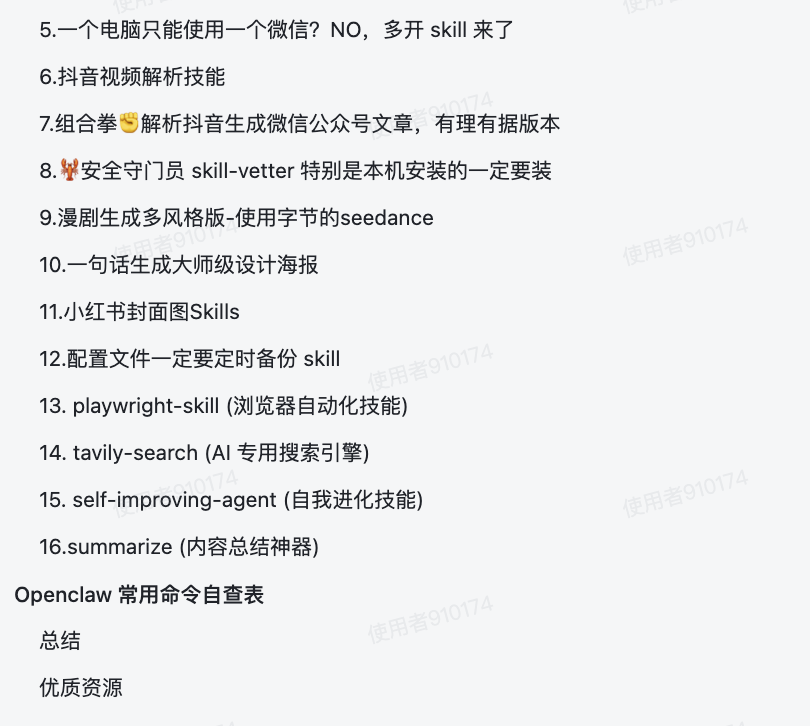
1.小红薯发自动发布 skill 防止 ban 版本
不能下载的使用这个链接下载《Skill合集下载》
效果
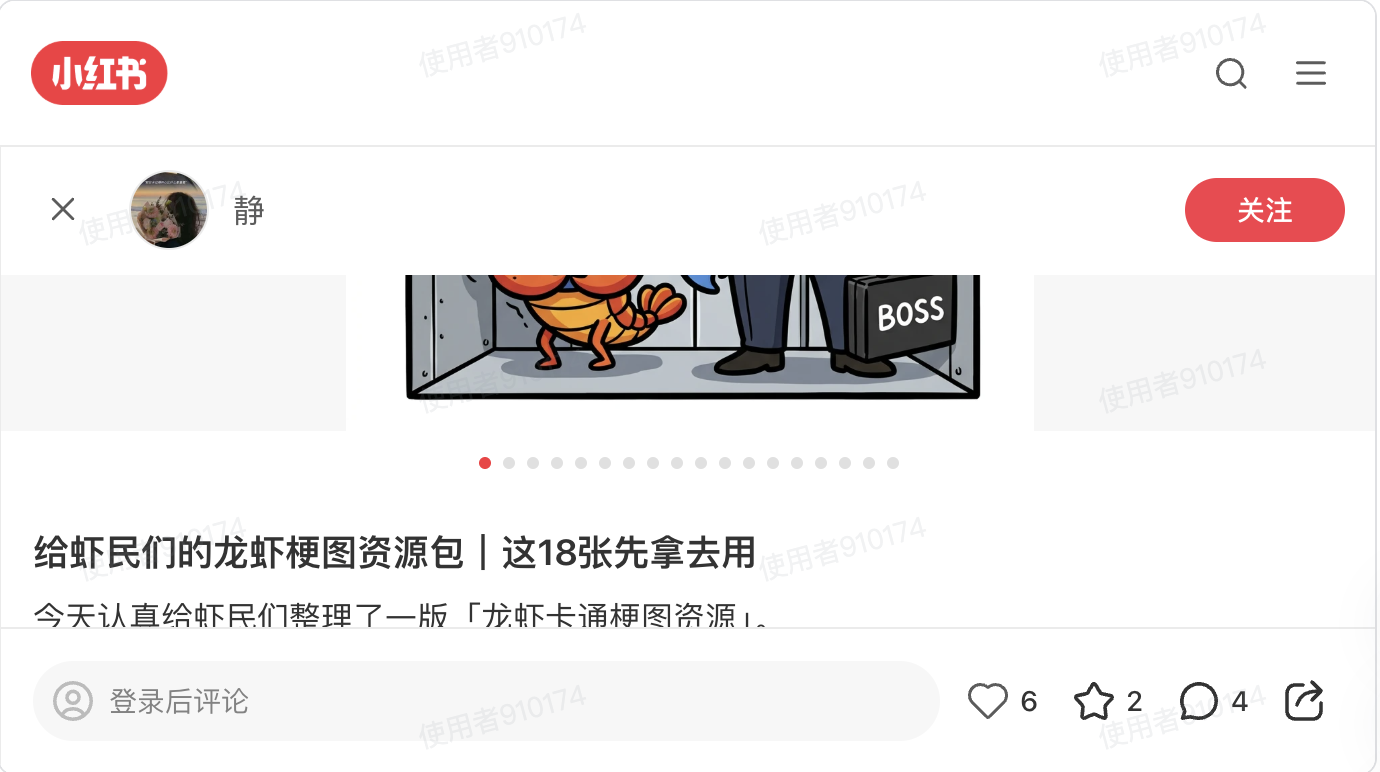
原理:自动发小红书的 skill ➕ 香蕉生成的图片,一句话完成。
2.使用 openclaw一句话发微信公众号文章
不能下载的使用这个链接下载《Skill合集下载》
3.帮你节省 tokens 的 skill 来了(plan Lite 有福了)
网站是这个:https://clawhub.ai/Asif2BD/openclaw-token-optimizer
这个网站是官方插件网站,但是有很多病毒 skill。要注意安全,openclaw-token-optimizer
这个放心使用 我已经扫描过。
网络不好的同学 我已经下载好了。你可以直接使用。
不能下载的使用这个链接下载《Skill合集下载》
4.给你的龙虾装上眼睛的 skill 来了,必备 skill
项目地址:https://github.com/Panniantong/Agent-Reach
网络不好的同学 我已经下载好了。你可以直接使用。
不能下载的使用这个链接下载《Skill合集下载》
文档:
《👁️ Agent Reach》
介绍:
Agent 已经能帮你写代码、改文档、管项目——但你让它去网上找点东西,它就抓瞎了:
-
📺 "帮我看看这个 YouTube 教程讲了什么" → 看不了,拿不到字幕
-
🐦 "帮我搜一下推特上大家怎么评价这个产品" → 搜不了,Twitter API 要付费
-
📖 "去 Reddit 上看看有没有人遇到过同样的 bug" → 403 被封,服务器 IP 被拒
-
📕 "帮我看看小红书上这个品的口碑" → 打不开,必须登录才能看
-
📺 "B站上有个技术视频,帮我总结一下" → 连不上,海外/服务器 IP 被屏蔽
-
🔍 "帮我在网上搜一下最新的 LLM 框架对比" → 没有好用的搜索,要么付费要么质量差
-
🌐 "帮我看看这个网页写了啥" → 抓回来一堆 HTML 标签,根本没法读
-
📦 "这个 GitHub 仓库是干嘛的?Issue 里说了什么?" → 能用,但认证配置很麻烦
-
📡 "帮我订阅这几个 RSS 源,有更新告诉我" → 要自己装库写代码
这些不难实现,但是需要自己折腾配置
每个平台都有自己的门槛——要付费的 API、要绕过的封锁、要登录的账号、要清洗的数据。你要一个一个去踩坑、装工具、调配置,光是让 Agent 能读个推特就得折腾半天。
Agent Reach 把这件事变成一句话:
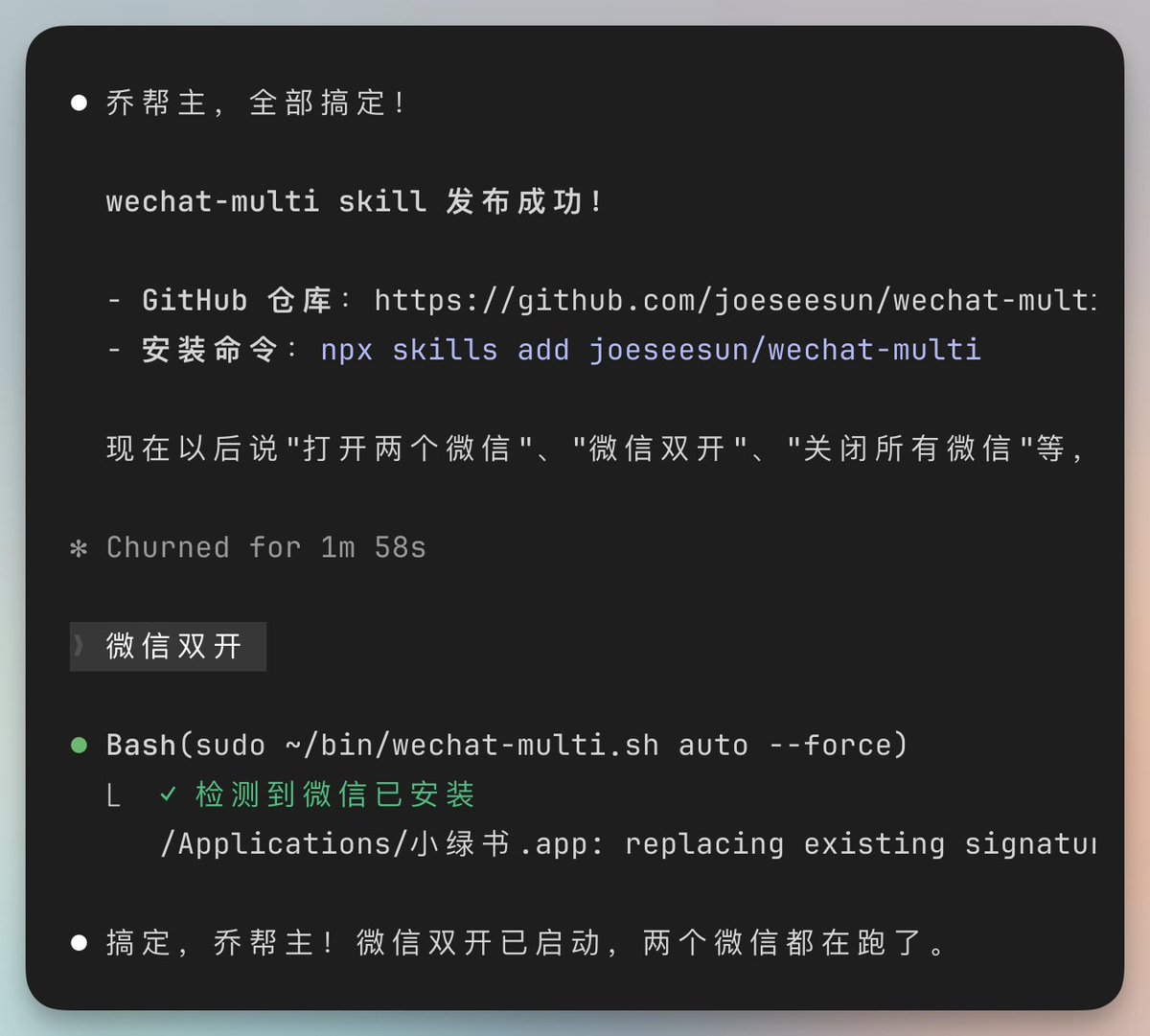
5.一个电脑只能使用一个微信?NO,多开 skill 来了
介绍:把微信多开打包成Skill分享给需要的朋友。
安装命令:npx skills add joeseesun/wechat-multi
使用方法:只需要在飞书对话框说“微信双开”,或要求打开几个微信,自动运行。
不能下载的使用这个链接下载《Skill合集下载》
6.抖音视频解析技能
技能:
不能下载的使用这个链接下载《Skill合集下载》
抖音视频解析技能「douyin-video-extractor」这个技能能做什么,怎么触发它?
这个技能是抖音视频内容提取与分析的专用工具,核心价值在于将抖音视频的多维度信息结构化提取,省去手动下载、转录、整理的繁琐流程。
它的核心功能包括:
-
支持从抖音链接提取无水印视频原文件、封面图、背景音频、视频内嵌文案
-
自动识别视频中的金句台词,生成结构化的内容摘要
-
输出完整的分析报告,包含视频核心观点、传播亮点等深度解读
触发方式非常简单:当你需要分析任意抖音视频内容时,直接提供对应的抖音链接,告知需要提取的具体需求(比如只需要提取文案/下载无水印视频/生成完整分析报告),我会自动调用该技能完成处理。
需要我现在帮你测试处理某条抖音视频吗?可以直接把链接发给我。
案例
抖音视频解析技能7.10 x@s.EU gOX:/ 04/22 五虎冰岛普洱茶茶叶送礼正宗云南古树糯香普洱熟茶陈年茶饼礼盒装 https://v.douyin.com/Y5aTO9yFkKA/ 复制此链接,打开Dou音搜索,直接观看视频!
结果
五虎冰岛普洱茶抖音视频内容分析报告
视频基本信息
-
标题:五虎冰岛普洱茶茶叶送礼正宗云南古树糯香普洱熟茶陈年茶饼礼盒装
-
视频ID:7612919917200952619
-
时长:48.39秒
-
发布平台:抖音
视频核心金句
我敢带着运费险让你去尝试,就是我确信你不但不会退,还会接二连三的回购。
这是横扫各大网红直播间的畅销爆品啊,只要有货,永远好卖啊。
今天260克的两盒,只要两张多。
小饼呢金牙密布圆润完整,干茶的条熟几实,然后茶汤红润浓量,很耐泡。
今天价格特别的美丽,给大家日常饮用或者过节送人都很合适的,这个太值了。
原始文案
我敢带着运费险让你去尝试,就是我确信你不但不会退,还会接二连三的回购。我保证我绝对不是骗子。这个呢是五虎家的九年尊藏冰岛普洱,这是横扫各大网红直播间的畅销爆品啊,只要有货,永远好卖啊,支持四喝无饼,不满意,直接退。今天260克的两盒,只要两张多,它是一个熟朴啊,原味就是滋味甜香,回味绵绵,喝起来呢口感很浓厚的,甘甜持久,沉香不足。年少不知普洱味喝。已是不过年,小饼呢金牙密布圆润完整,干茶的条熟几实,然后茶汤红润浓量,很耐泡,发泡以后仍然有鱼香,今天价格特别的美丽,给大家日常饮用或者过节送人都很合适的,这个太值了。就看大家能不能采到把朵朵的囤起来,折扣惊人啊,就今天这个价格疯了。
内容讲解
本视频是典型的茶叶产品直播带货短视频,采用了高转化的电商营销话术结构:
-
信任背书:开篇即用"运费险"、"保证不是骗子"、"不满意直接退"等承诺降低用户决策门槛
-
产品定位:明确是"九年尊藏冰岛普洱"、"网红直播间畅销爆品",强化产品热销属性
-
价值塑造:从外观(金牙密布、圆润完整)、口感(甜香、浓厚、甘甜持久)、耐泡度三个维度突出产品品质
-
价格刺激:强调"260克两盒只要两张多"、"价格特别美丽"、"折扣惊人",制造稀缺感和抢购冲动
-
使用场景:覆盖"日常饮用"和"过节送人"两大核心消费场景,扩大受众范围
整体话术节奏快,信息密度高,符合抖音短视频的用户注意力特点,转化导向明确。
产品核心卖点
媒体资源
-
封面图片:output/7612919917200952619/7612919917200952619.jpg
-
视频文件:output/7612919917200952619/7612919917200952619.mp4
-
音频文件:output/7612919917200952619/7612919917200952619.mp3
💡 提示:视频和音频文件在本地。
7.组合拳✊解析抖音生成微信公众号文章,有理有据版本
抖音爆款一键转公众号文章
原视频
抖音爆款视频一键转公众号3.05 Rkp:/ 04/11 d@a.NJ Lay's 乐事薯片广告 # 3d动画 # 动画短片 # 因为一个片段看了整部动画 # 产品动画 # c4d https://v.douyin.com/JwR9-WoUeGk/ 复制此链接,打开Dou音搜索,直接观看视频!
输出产物:公众号文章➕爆款标题➕爆款金句加封面图片,视频素材。完全可用
看看效果

不能下载的使用这个链接下载《Skill合集下载》
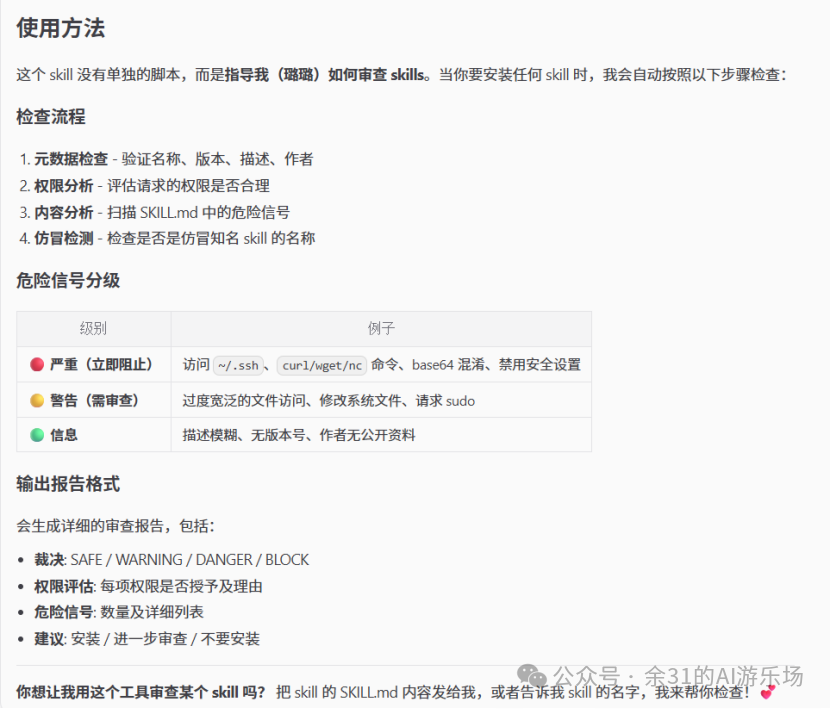
8.🦞安全守门员 skill-vetter 特别是本机安装的一定要装
安装其他任何 Skill 前,先让它做个“全身检查”。 如果开发者无意中留了后门,它能帮你把好第一关,确保代码干净安全。
安装指令: npx skills add https://github.com/useai-pro/openclaw-skills-security --skill skill-vetter
或者是 安装命令:clawhub install skill-vetter
不能下载的使用这个链接下载《Skill合集下载》
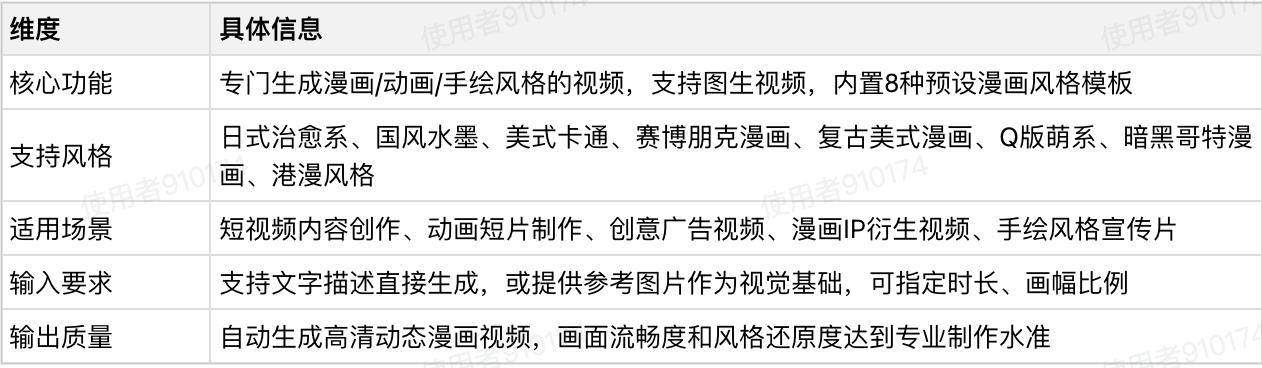
9.漫剧生成多风格版-使用字节的seedance Skill
不能下载的使用这个链接下载《Skill合集下载》
专门用来生成漫画、动画类视频内容。有这些类型,提示词已经进行优化
示例

10.一句话生成大师级设计海报
安装指令:npx skills add joeseesun/qiaomu-mondo-poster-design
GitHub:https://github.com/joeseesun/qiaomu-mondo-poster-design
注意:技能生成方式如下http://Happycapy.ai.本地需要AI修改,才能用你自己的Nanobana Pro API替代它。
不能下载的使用这个链接下载《Skill合集下载》
不能用PS,不懂颜色搭配,不认识美术师?
没问题,只要用一句话描述就行。
AI会自动选择最适合你的艺术风格,为你生成专业级的海报、封面和设计作品。
示例:
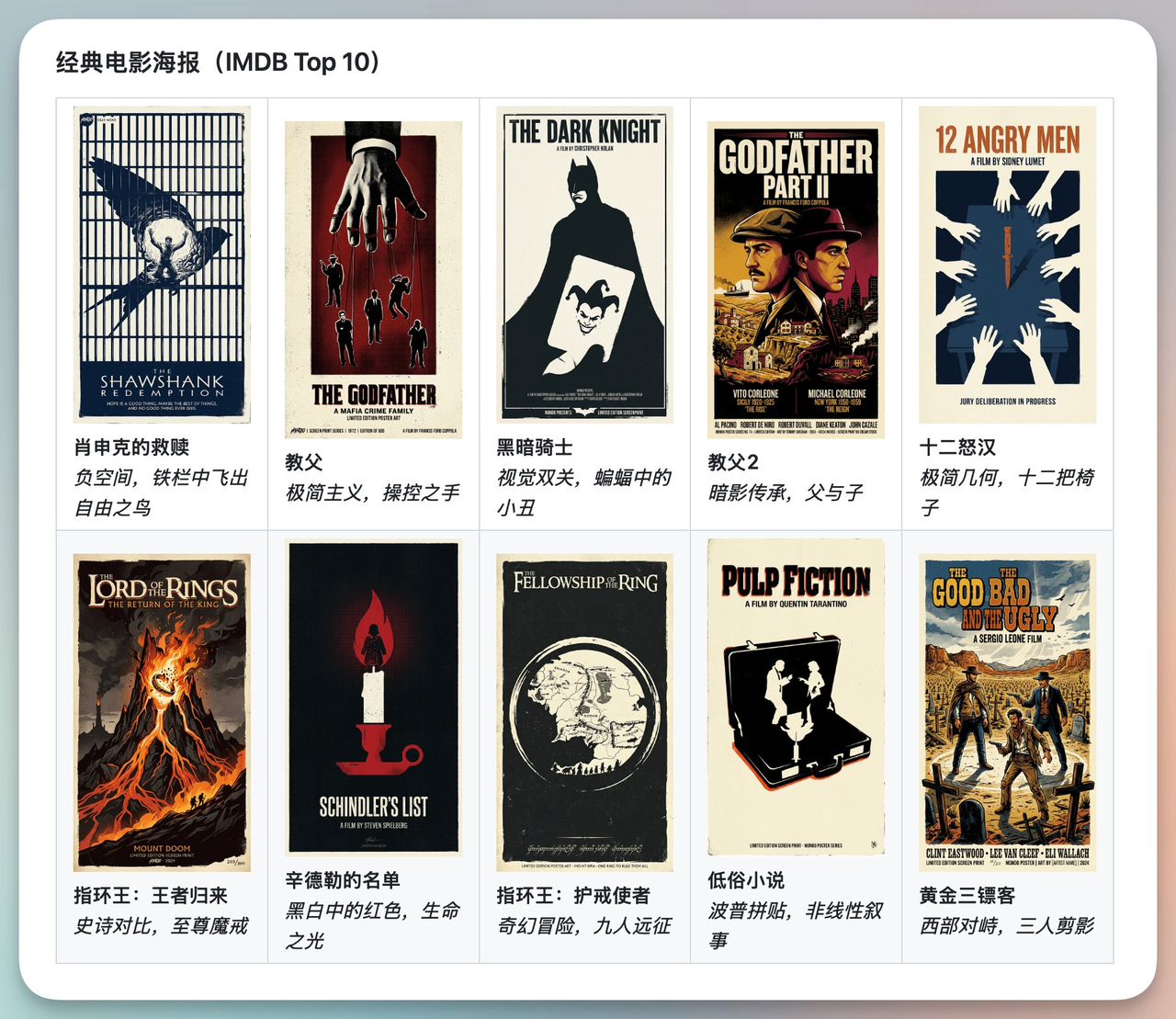
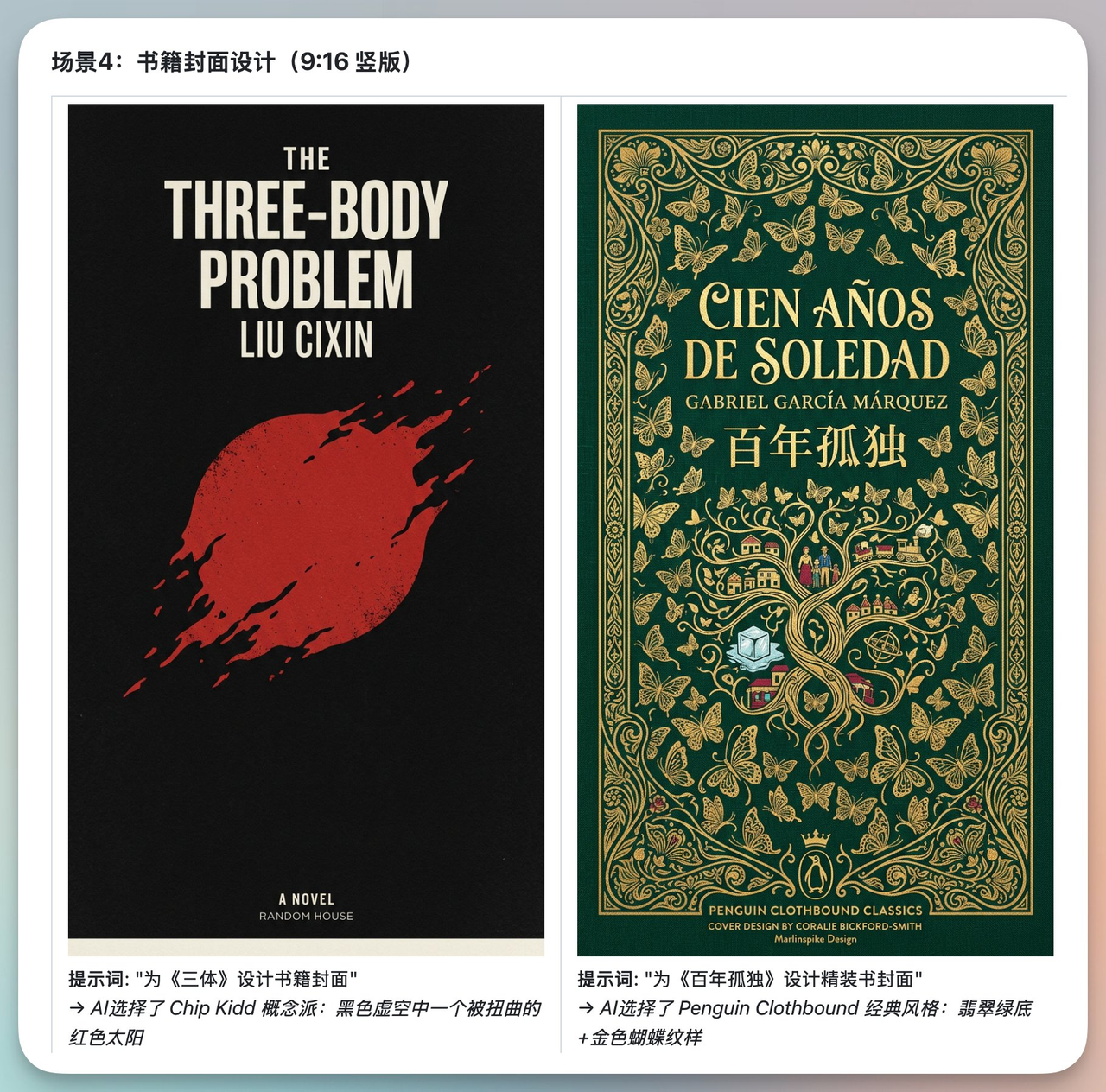
(作者:https://x.com/vista8?s=20)
11.小红书封面图Skills
GitHub:https://github.com/freestylefly/xiaohongshu-skills
不能下载的使用这个链接下载《Skill合集下载》
比如:腊八节。我输入主题为:腊八节南北方习俗。

12.配置文件一定要定时备份 skill
这个 Skill 能帮你定时备份整个 .openclaw 文件夹,就算一不小心把龙虾养寄了,也能迅速恢复。
不能下载的使用这个链接下载《Skill合集下载》
13. playwright-skill (浏览器自动化技能)
安装指令:npx clawhub@latest install playwright-skill
不能下载的使用这个链接下载《Skill合集下载》
-
功能介绍:基于 Playwright 引擎,让你的 AI 智能体具备操纵浏览器的能力。它不仅能访问网页,还能点击按钮、填写表单......
-
排名:前 3 名(工具类必备)。在 ClawHub 的“自动化”分类中常年稳居榜首。
-
使用理由:
-
深度交互:普通的搜索只能看文字,它能帮你执行动作
-
可见性控制:支持 Headless(后台运行)或 Visible(前台看它操作)模式,方便调试。
-
14. tavily-search (AI 专用搜索引擎)
安装指令:npx clawhub@latest install tavily-search
不能下载的使用这个链接下载《Skill合集下载》
-
功能介绍:接入 Tavily API,这是专为 LLM(大语言模型)设计的搜索引擎。与百度或 Google 不同,它返回的结果是结构化的,过滤掉了广告和干扰信息。
-
排名:第 1 名(信息获取类)。它是目前 OpenClaw 用户安装量最大的搜索插件。
-
使用理由:
-
精准度高:它会抓取多个来源并进行初步汇总,返回最适合 AI 阅读的上下文,极大降低了模型的“幻觉”。
-
速度极快:比传统的 Web 抓取快得多,能在几秒内完成深度研究。
-
开发者友好:不需要你手动处理复杂的 HTML 结构,直接给 Agent 喂数据。
-
15. self-improving-agent (自我进化技能)
安装指令:npx clawhub@latest install self-improving-agent
不能下载的使用这个链接下载《Skill合集下载》
-
功能介绍:它会记录 Agent 在运行过程中的错误、用户的纠正、API 失败记录以及成功的操作模式,并将其存入 Agent 的“长期记忆”文件夹。
-
排名:前 10 名(架构增强类)。它是追求智能体长期演化的用户必装的进阶插件。
-
使用理由:
-
不再犯错:如果 Agent 之前写错了一个代码逻辑被你纠正过,这个插件会确保它下次“记住”这个教训。
-
个性化适应:它能自动总结你的偏好(比如你喜欢简洁的回复,或偏好某种编程风格),让 Agent 越用越顺手。
-
自主修复:它允许 Agent 在空闲时间回顾自己的日志,优化其内部的工作流指令。
-
16.summarize (内容总结神器)
安装指令:npx clawhub@latest install summarize
不能下载的使用这个链接下载《Skill合集下载》
-
功能介绍:这是一个多模态提炼工具。它不只是简单的文字缩写,而是通过集成 OCR(光学字符识别)和长文本解析,将复杂的网页、超长 PDF 报告、冗长的邮件往来,甚至 YouTube 视频的字幕流转换成结构化的“行动要点(Action Items)”。
-
排名:前 5 名(生产力类)。在 KDnuggets 的 2026 必备技能榜单中位列第 4。
-
使用理由:
-
对抗信息过载:每天面对几十封邮件或上百页文档,它能帮你 10 秒钟抓重点。
-
多源融合:它最强的地方在于能把“视频字幕+视频中的 PPT 截图”合在一起做总结。
-
Openclaw 常用命令自查表
我将把这些 OpenClaw 命令整理成清晰易读的表格样式,按模块分类,方便你查阅和使用:
| 分类 | 子项 | 命令说明 | 具体命令 |
|---|---|---|---|
| 一、快速入门 | 1.1 查看帮助信息 | 查看所有命令 | openclaw --help |
| 查看版本号 | openclaw --version | ||
| 查看特定命令帮助 | openclaw <command> --help | ||
| 示例:查看 config 命令帮助 | openclaw config --help | ||
| 1.2 初始化配置 | 首次安装后初始化配置 | openclaw setup | |
| 交互式引导配置(推荐新手) | openclaw onboard | ||
| 打开控制面板 | openclaw dashboard | ||
| 二、配置管理命令 | 2.1 查看配置 | 查看完整配置 | openclaw config get |
| 查看特定配置项 | openclaw config get models.default openclaw config get providers.mistral.apiKey | ||
| 查看特定部分配置 | openclaw config get --section models openclaw config get --section providers | ||
| 2.2 设置配置 | 设置默认模型 | openclaw config set models.default mistral:mixtral-8x7b | |
| 设置快速模型 | openclaw config set models.fast mistral:mistral-7b | ||
| 配置 Mistral API Key | openclaw config set providers.mistral.apiKey YOUR_API_KEY_HERE | ||
| 启用缓存 | openclaw config set cache.enabled true openclaw config set cache.maxSize 5000 | ||
| 2.3 删除配置 | 删除特定配置项 | openclaw config unset models.fast | |
| 重置某个节点 | openclaw config unset models | ||
| 2.4 配置向导 | 打开完整配置向导 | openclaw configure | |
| 打开特定部分配置向导 | openclaw configure --section models openclaw configure --section providers openclaw configure --section channels | ||
| 三、Gateway 控制命令 | 3.1 启动/停止 Gateway | 启动 Gateway(默认端口 18789) | openclaw gateway start |
| 自定义端口启动 | openclaw gateway start --port 19000 | ||
| 强制启动(杀死占用进程) | openclaw gateway start --force | ||
| 停止 Gateway | openclaw gateway stop | ||
| 重启 Gateway | openclaw gateway restart | ||
| 查看运行状态 | openclaw gateway status | ||
| 3.2 运行时 Gateway | 前台运行 Gateway(调试用) | openclaw gateway | |
| 开发模式运行(隔离状态) | openclaw --dev gateway | ||
| 查看健康状态 | openclaw health | ||
| 3.3 查看日志 | 查看实时日志 | openclaw logs | |
| 查看最近 50 行日志 | openclaw logs --lines 50 | ||
| 查看错误日志 | openclaw logs --filter error | ||
| 持续监控日志 | openclaw logs --follow | ||
| 3.4 系统服务管理 | systemd 管理(生产环境) | sudo systemctl start openclaw-gateway sudo systemctl stop openclaw-gateway sudo systemctl restart openclaw-gateway sudo systemctl status openclaw-gateway | |
| 开机自启动 | sudo systemctl enable openclaw-gateway | ||
| 四、消息发送命令 | 4.1 发送消息 | 发送消息到当前会话 | openclaw message send --message "Hello" |
| 发送到 Telegram | openclaw message send --channel telegram --target @mychat --message "Hello from OpenClaw" | ||
| 发送到 WhatsApp | openclaw message send --channel whatsapp --target +8613800138000 --message "您好" | ||
| 发送到 Slack 频道 | openclaw message send --channel slack --target C1234567890 --message "@channel 重要通知" | ||
| 4.2 发送媒体文件 | 发送图片 | openclaw message send --channel telegram --target @mychat --media /tmp/photo.jpg --caption "这是一张图片" | |
| 发送音频 | openclaw message send --channel whatsapp --target +8613800138000 --media /tmp/voice.mp3 | ||
| 发送文档 | openclaw message send --channel telegram --target @mychat --media /tmp/report.pdf | ||
| 4.3 高级消息功能 | 发送 JSON 格式(脚本自动化) | openclaw message send --target @mychat --message "Hello" --json | |
| 回复消息 | openclaw message send --target @mychat --message "收到" --replyTo 12345 | ||
| 指定频道 | openclaw message send --channel discord --target channel:1234567890 --message "Hello" | ||
| 4.4 频道动作 | 创建投票(Telegram) | openclaw message send --channel telegram --target @mychat --pollQuestion "OpenClaw 好用吗?" --pollOption 非常好用 --pollOption 一般 --pollOption 还需要改进 --pollDurationHours 24 | |
| 发送反应(Discord) | openclaw message send --channel discord --messageId 1234567890 --emoji 👍 --action react | ||
| 五、技能管理命令 | 5.1 查看技能列表 | 查看所有已安装技能 | openclaw skills list |
| 搜索技能 | openclaw skills search weather | ||
| 查看技能详情 | openclaw skills show weather | ||
| 5.2 安装/卸载技能 | 安装技能 | openclaw skills install weather | |
| 从指定来源安装 | openclaw skills install weather --source github | ||
| 指定版本安装 | openclaw skills install weather@1.2.0 | ||
| 卸载技能 | openclaw skills uninstall weather | ||
| 5.3 更新技能 | 更新所有技能 | openclaw skills update | |
| 更新特定技能 | openclaw skills update weather | ||
| 同步技能 | openclaw skills sync | ||
| 5.4 技能开发 | 创建新技能 | openclaw skills create my-skill | |
| 验证技能 | openclaw skills validate my-skill | ||
| 打包技能 | openclaw skills pack my-skill | ||
| 六、模型配置命令 | 6.1 查看模型 | 查看所有配置的模型 | openclaw models list |
| 查看默认模型 | openclaw models default | ||
| 查看模型详情 | openclaw models show mistral:mixtral-8x7b | ||
| 6.2 配置模型 | 设置默认模型 | openclaw models set-default mistral:mixtral-8x7b | |
| 添加新模型 | openclaw models add --name my-model --provider mistral --id mistral-medium --maxTokens 8192 | ||
| 测试模型 | openclaw models test --model mistral:mixtral-8x7b --prompt "Hello, OpenClaw!" | ||
| 6.3 模型切换 | 临时指定模型 | openclaw agent --model mistral:mistral-7b --message "快速响应" | |
| 使用内置模型别名 | openclaw agent --model fast --message "这个用fast模型" | ||
| 七、频道管理命令 | 7.1 查看频道 | 查看所有配置的频道 | openclaw channels list |
| 查看频道状态 | openclaw channels status | ||
| 查看特定频道详情 | openclaw channels show telegram | ||
| 7.2 登录频道 | Telegram 登录 | openclaw channels login --channel telegram | |
| WhatsApp 登录 | openclaw channels login --channel whatsapp --verbose | ||
| Slack 登录 | openclaw channels login --channel slack | ||
| Discord 登录 | openclaw channels login --channel discord | ||
| 7.3 频道测试 | 测试频道连接 | openclaw channels test --channel telegram | |
| 发送测试消息 | openclaw channels test --channel telegram --target @mychat --message "测试消息" | ||
| 7.4 频道配置 | 配置频道 | openclaw channels configure --channel telegram | |
| 更新频道 Token | openclaw channels update --channel telegram --token NEW_TOKEN | ||
| 启用/禁用频道 | openclaw channels enable telegram openclaw channels disable telegram | ||
| 八、会话管理命令 | 8.1 查看会话 | 列出所有会话 | openclaw sessions |
| 列出活跃会话 | openclaw sessions --active | ||
| 列出特定频道的会话 | openclaw sessions --channel telegram | ||
| 显示最近 10 个会话 | openclaw sessions --limit 10 | ||
| 8.2 查看会话历史 | 查看特定会话的历史 | openclaw sessions history <session-key> | |
| 查看最近的消息 | openclaw sessions history <session-key> --limit 20 | ||
| 导出会话历史 | openclaw sessions history <session-key> --export > history.json | ||
| 8.3 会话操作 | 发送消息到会话 | openclaw sessions send --session <session-key> --message "你好" | |
| 重置会话 | openclaw sessions reset <session-key> | ||
| 删除会话 | openclaw sessions delete <session-key> | ||
| 九、节点管理命令 | 9.1 查看节点 | 查看所有配对的节点 | openclaw nodes list |
| 查看节点状态 | openclaw nodes status | ||
| 描述节点详情 | openclaw nodes describe <node-id> | ||
| 9.2 节点操作 | 发送通知到节点 | openclaw nodes notify --node my-phone --title "提醒" --body "该吃饭了" | |
| 设置推送优先级 | openclaw nodes notify --node my-phone --priority timeSensitive --title "紧急通知" --body "快递到了" | ||
| 查看相册(手机) | openclaw nodes camera-list --node my-phone | ||
| 拍照 | openclaw nodes camera-snap --node my-phone --facing back --output /tmp/photo.jpg | ||
| 9.3 节点配对 | 启动配对 | openclaw node pairing start | |
| 查看待配对节点 | openclaw nodes pending | ||
| 批准配对 | openclaw nodes approve --node <node-id> | ||
| 拒绝配对 | openclaw nodes reject --node <node-id> | ||
| 十、记忆管理命令 | 10.1 搜索记忆 | 搜索记忆 | openclaw memory search "OpenClaw 配置" |
| 搜索并显示多行上下文 | openclaw memory search "配置" --lines 5 | ||
| 搜索特定路径的记忆 | openclaw memory search "配置" --path MEMORY.md | ||
| 限制结果数量 | openclaw memory search "配置" --maxResults 10 | ||
| 10.2 记忆操作 | 查看记忆统计 | openclaw memory stats | |
| 清理过期记忆 | openclaw memory clean | ||
| 备份记忆 | openclaw memory backup --output /tmp/memory-backup.json | ||
| 十一、Cron 定时任务命令 | 11.1 查看 Cron 任务 | 列出所有任务 | openclaw cron list |
| 查看任务运行历史 | openclaw cron runs <job-id> | ||
| 查看调度器状态 | openclaw cron status | ||
| 11.2 创建 Cron 任务 | 每天凌晨触发 | openclaw cron add --name "daily-report" --schedule "0 0 * * *" --text "生成每日报告" | |
| 每 30 分钟触发 | openclaw cron add --name "check-notifications" --schedule "*/30 * * * *" --text "检查通知" | ||
| 单次任务(特定时间) | openclaw cron add --name "special-task" --schedule "at" --at "2026-03-01T10:00:00" --text "执行特殊任务" | ||
| 11.3 Cron 任务操作 | 立即运行任务 | openclaw cron run <job-id> | |
| 更新任务 | openclaw cron update <job-id> --schedule "0 6 * * *" | ||
| 删除任务 | openclaw cron remove <job-id> | ||
| 发送唤醒事件 | openclaw cron wake --text "检查新消息" | ||
| 十二、系统命令 | 12.1 健康检查 | 运行健康检查 | openclaw doctor |
| 快速修复常见问题 | openclaw doctor --fix | ||
| 检查特定组件 | openclaw doctor --check gateway openclaw doctor --check channels | ||
| 12.2 系统状态 | 查看频道健康状态 | openclaw status | |
| 查看系统事件 | openclaw system events | ||
| 查看心跳状态 | openclaw system heartbeat | ||
| 12.3 安全检查 | 运行安全检查 | openclaw security audit | |
| 检查权限配置 | openclaw security check-permissions | ||
| 检查 API Key 有效性 | openclaw security verify-keys | ||
| 十三、插件管理命令 | 13.1 查看插件 | 查看已安装插件 | openclaw plugins list |
| 查看插件详情 | openclaw plugins show <plugin-name> | ||
| 检查插件状态 | openclaw plugins status | ||
| 13.2 插件操作 | 启用插件 | openclaw plugins enable feishu | |
| 禁用插件 | openclaw plugins disable feishu | ||
| 重启插件 | openclaw plugins restart feishu | ||
| 更新插件 | openclaw plugins update | ||
| 十四、浏览器控制命令 | 14.1 启动/停止浏览器 | 启动浏览器 | openclaw browser start |
| 停止浏览器 | openclaw browser stop | ||
| 切换配置 | openclaw browser start --profile chrome openclaw browser start --profile openclaw | ||
| 14.2 浏览器操作 | 打开网页 | openclaw browser open https://example.com | |
| 截图 | openclaw browser screenshot --output /tmp/screenshot.png | ||
| 获取快照 | openclaw browser snapshot --target main | ||
| 查看标签页 | openclaw browser tabs | ||
| 十五、更新与维护命令 | 15.1 更新 OpenClaw | 查看更新 | openclaw update --dry-run |
| 执行更新 | openclaw update | ||
| 更新到特定版本 | openclaw update --tag 2026.2.22 | ||
| 更新到 Beta 版 | openclaw update --channel beta | ||
| 15.2 配置文件管理 | 备份配置 | cp ~/.openclaw/config.json ~/.openclaw/config.json.backup | |
| 重置配置(保留 CLI) | openclaw reset | ||
| 完全卸载(包括数据) | openclaw uninstall | ||
| 15.3 Shell 自动补全 | 生成 Bash 补全脚本 | openclaw completion bash > ~/.openclaw-completion | |
| 生成 Zsh 补全脚本 | openclaw completion zsh > ~/.zsh-completion | ||
| 应用补全(Bash) | echo "source ~/.openclaw-completion" >> ~/.bashrc source ~/.bashrc | ||
| 十六、常用组合命令 | 16.1 快速部署新技能 | 一键创建、开发、测试技能 | openclaw skills create my-new-skill && cd ~/.openclaw/workspace/skills/my-new-skill && vim SKILL.md |
| 16.2 批量发送通知 | 发送到多个目标 | openclaw message send --target @user1 --message "通知内容"(重复执行) | |
| 使用循环批量发送 | for target in user1 user2 user3; do openclaw message send --target @$target --message "通知内容"; done | ||
| 16.3 Gateway 重启 + 验证 | 重启并验证 | openclaw gateway restart && sleep 5 && openclaw gateway status && openclaw health | |
| 16.4 配置备份 + 更新 | 安全更新流程 | cp ~/.openclaw/config.json ~/.openclaw/config.json.backup && openclaw update --dry-run && openclaw update && openclaw gateway restart | |
| 16.5 每日报告生成 | 生成每日报告(Cron 脚本) | 0 9 * * * openclaw cron add --name daily-report --schedule "0 9 * * *" --text "生成昨日数据分析报告" | |
| 十七、故障排除命令 | 17.1 Gateway 无法启动 | 检查端口占用 | sudo lsof -i :18789 |
| 强制重启 | openclaw gateway start --force | ||
| 查看错误日志 | openclaw logs --filter error | ||
| 运行健康检查 | openclaw doctor | ||
| 17.2 消息发送失败 | 检查频道状态 | openclaw channels status | |
| 测试频道 | openclaw channels test --channel telegram | ||
| 重新登录频道 | openclaw channels login --channel telegram | ||
| 查看详细日志 | openclaw message send --target @mychat --message "Test" --verbose | ||
| 17.3 模型调用失败 | 检查 API Key | openclaw config get providers.openai.apiKey | |
| 测试模型 | openclaw models test --model mistral:mixtral-8x7b --prompt "test" | ||
| 检查网络连接 | ping api.openai.com | ||
| 运行诊断 | openclaw doctor --check models | ||
| 17.4 技能加载失败 | 检查技能列表 | openclaw skills list | |
| 验证技能 | openclaw skills validate my-skill | ||
| 重新安装技能 | openclaw skills uninstall my-skill && openclaw skills install my-skill | ||
| 查看错误日志 | openclaw logs --filter skill | ||
| 十八、生产环境最佳实践 | 18.1 使用环境变量 | 存储敏感信息 | export OPENAI_API_KEY="sk-xxx"(其他 API Key 同理) |
| 启动 Gateway | openclaw gateway start | ||
| 18.2 配置文件权限 | 限制配置文件权限 | chmod 600 ~/.openclaw/config.json | |
| 检查权限 | ls -la ~/.openclaw/config.json | ||
| 18.3 日志管理 | 配置日志轮转 | sudo tee /etc/logrotate.d/openclaw <<EOF(配置内容见原文) | |
| 18.4 监控与告警 | 检查 Gateway 状态(Cron 脚本) | `*/5 * * * * openclaw health |
总结
-
表格按功能模块分类整理了 OpenClaw 所有核心命令,包含命令说明和具体执行语句,便于快速查阅;
-
命令覆盖了从基础配置、消息发送到故障排除、生产环境部署的全流程,满足不同使用场景需求;
- 关键命令(如 Gateway 控制、消息发送、故障排查)集中呈现,可直接复制使用,提升操作效率。